
Download FontView – font preview, font manager, font installer, font viewer, font selector, text sample, font library
Overview
FontView is a dedicated utility designed to simplify the process of managing and selecting fonts on Windows-based systems. The application serves as a centralized hub for users who work with typography, design, or document creation, offering a streamlined way to browse, preview, and install fonts directly from a single interface. By presenting all installed fonts in a clear, organized layout, FontView eliminates the need to manually search through system folders or rely on less intuitive methods.
Its primary purpose is to solve the common challenge of font discovery and selection, particularly for users who have large font libraries or frequently switch between typefaces. Whether you're a graphic designer, content creator, or someone preparing professional documents, FontView enables accurate font visualization by displaying custom text samples in real time across all available fonts. This functionality enhances precision in design decisions and reduces time spent on trial-and-error comparisons.
Targeted at both casual users and professionals, the app is especially beneficial for individuals working in creative fields where typographic consistency and aesthetic quality are essential. The developer, FontView, has maintained a long-standing presence in the productivity software space, with the app first released in 2006. Despite its age, the tool remains relevant due to its focused functionality and lightweight design.
FontView plays a niche but valuable role in the Windows ecosystem by offering a no-frills, efficient solution for font management. It supports a wide range of use cases, from quick font checks in office work to deeper exploration of typographic options in branding projects. Its continued availability as a free tool underscores its commitment to accessibility and user empowerment.
Key Features & Functionality
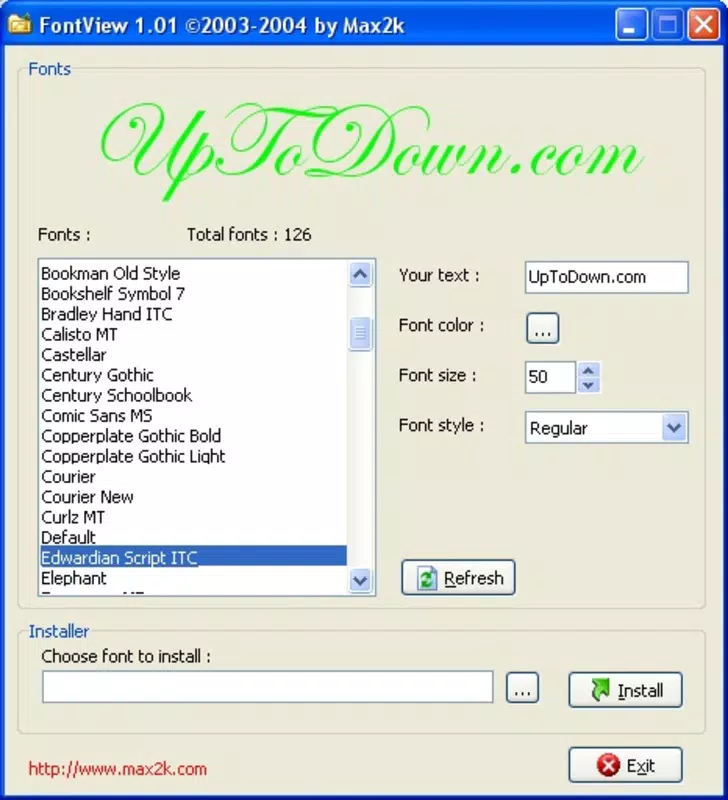
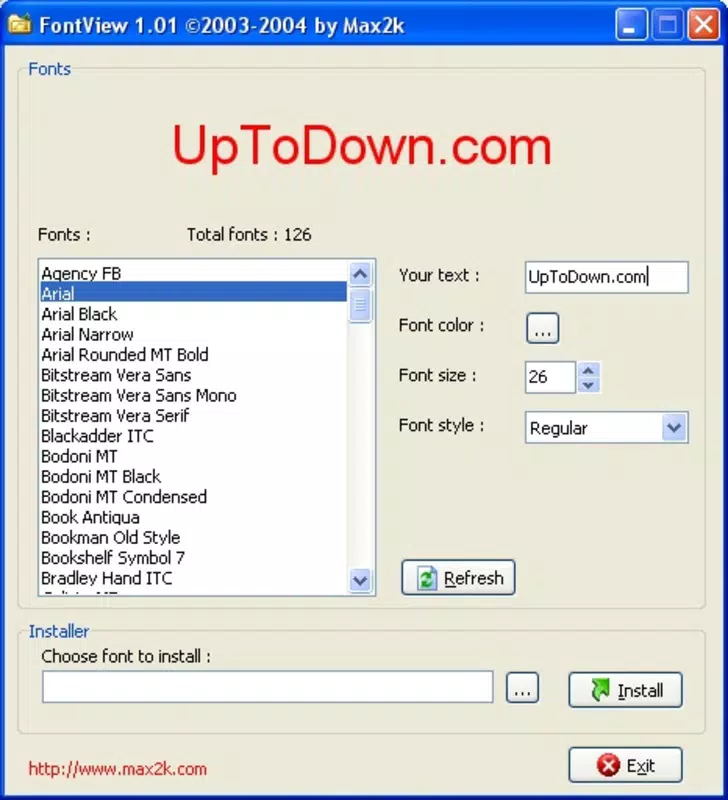
- Comprehensive Font List: FontView displays every font installed on the system in a single, scrollable interface. This allows users to instantly locate specific typefaces without navigating through system directories.
- Text Input Preview: Users can enter any custom text and view it rendered in all available fonts. This real-time preview helps evaluate how different fonts affect readability, tone, and visual impact.
- Easy Font Selection: With clear visual comparisons, users can quickly identify and select their preferred font based on appearance and context, improving workflow efficiency.
- Font Installation Feature: The app enables direct installation of new fonts through its interface, allowing users to expand their font library without leaving the application.
- User-Friendly Interface: The clean, minimalist layout ensures intuitive navigation, making the tool accessible even to non-technical users.
For example, a designer preparing a logo might use FontView to test how a brand name appears in multiple serif and sans-serif fonts. A student writing a research paper could use the text preview to ensure consistent formatting across sections. The ability to install fonts on the fly is particularly useful for users who frequently download new typefaces from online repositories.
These features collectively enhance productivity by reducing friction in the font selection process. The integration of preview and installation within one tool minimizes context switching, supporting faster, more informed decisions.
Interface, UX & Performance
FontView features a straightforward interface that prioritizes clarity and usability. The layout organizes fonts in a vertical list, with each entry displaying the font name and a live preview of the user-entered text. This design ensures that visual comparison is immediate and intuitive, reducing cognitive load during decision-making.
Navigational flow is simple: users input text, browse the font list, and select a preferred typeface with minimal steps. The absence of complex menus or hidden settings contributes to a smooth user experience, especially for those unfamiliar with advanced font management tools.
Although the developer did not list formal performance metrics, the app’s file size of 2.5 MB suggests a lightweight footprint, likely resulting in fast startup times and minimal system resource usage. It is expected to perform efficiently across various Windows device categories, including older or lower-end systems.
Responsiveness is consistent with the app’s design philosophy—simple, quick, and reliable. Stability appears to be well-maintained, given the app’s long history and continued availability. No known issues related to crashes or freezes were reported in the provided information.
Platform Compatibility & Technical Requirements
FontView is designed exclusively for the Windows operating system. The current version, 2.1.0, is compatible with Windows platforms, though specific OS versions were not listed by the developer. Users should ensure their system meets the minimum requirements for running Windows applications, particularly those released in the mid-2000s.
The app has a file size of 2.5 MB, indicating it is a compact utility that requires minimal storage space. This small footprint makes it suitable for use on systems with limited disk capacity or older hardware.
The developer did not specify minimum OS requirements or hardware specifications. Compatibility information was not fully disclosed, so users are advised to test the app on their system to confirm functionality.
Pros and Cons
Pros
- Free to download and use, making it accessible to all users.
- Lightweight design with a small file size of 2.5 MB.
- Provides real-time text previews across all installed fonts.
- Enables direct font installation from within the app interface.
- Simple, intuitive interface suitable for non-technical users.
Cons
- Platform is limited to Windows; no support for Android or iOS.
- Specific system requirements were not disclosed by the developer.
- App has not seen a major update since 2006, raising questions about modern compatibility.
- Limited to desktop use; no mobile or web version available.
- Developer did not provide additional technical details or support documentation.
FAQ
Is FontView available for Android or iOS?
FontView is currently designed only for Windows. There is no official version available for Android or iOS devices.
Can I install new fonts using FontView?
Yes, FontView includes a built-in feature that allows users to install new fonts directly through the application interface.
Is FontView safe to download and install?
As a long-standing utility with a free distribution model, FontView is considered secure. However, users should download it from trusted sources to avoid modified or potentially harmful versions.
Does FontView require an internet connection?
While the app does not require an internet connection for core functionality, an internet connection may be needed to download new fonts from external sources.
How often is FontView updated?
The last version, 2.1.0, was released in 2006. The developer has not released major updates since then, so the app may not support the latest Windows features or security standards.
Final Thoughts
FontView remains a valuable tool for anyone who frequently works with typography on Windows. Its ability to display a full list of installed fonts, preview custom text, and install new typefaces within a single interface offers a practical solution to a common workflow bottleneck. Despite its age and lack of recent updates, its lightweight nature and focused functionality continue to serve users in design, writing, and document preparation.
While it lacks modern features and platform versatility, FontView excels in simplicity and reliability. It’s particularly suited for users who value efficiency and do not need advanced font management capabilities. For those seeking a no-nonsense, free utility to streamline font selection, this app delivers consistent value.
Download FontView now


